Tree
The tree displays a hierarchy, for example the folders, pages and acts of a document corpus, as nested lists. It is designed to stay compact: each item takes exactly one line, long names are cut with an ellipsis, and each level is marked by a vertical guide line.
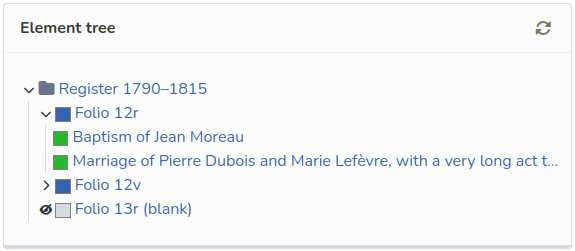
| See the tree in context on the demo page, in both light and dark themes. |
Usage
The tree is a ul.tree. Each li contains a .item (the line itself), then optionally a nested ul for its children:
<ul class="tree">
  <li>
    <div class="item"> (1)
      <button class="button is-compact icon" data-toggle> (2)
        <i class="icon-down-open expanded"></i> (3)
      </button>
      <span class="line"> (4)
        <span class="icon is-small"><i class="fa-solid fa-folder"></i></span>
        <a href="#">Register 1790–1815</a>
      </span>
    </div>
    <ul> (5)
      <li>
        <div class="item">
          <span class="line">
            <span class="color-square has-background-link"></span>
            <a href="#">Folio 12r</a>
          </span>
        </div>
      </li>
      <li>
        <div class="item">
          <span class="line">
            <span class="color-square has-background-link"></span>
            <a href="#">Folio 12v, with a very long name that will be cut with an ellipsis</a>
          </span>
        </div>
      </li>
    </ul>
  </li>
</ul>| 1 | .item: a single line, 1.5rem high, where buttons and text are vertically centered. |
| 2 | .button.is-compact: a borderless, transparent button fitting in the line. |
| 3 | .icon-down-open: an arrow pointing down when it has the expanded class, rotated to the right otherwise. |
| 4 | .line: the text of the item, never wrapped, cut with an ellipsis when too long. |
| 5 | A nested list is indented, with a vertical border as a guide. |
Structure and classes
| Selector | Role |
|---|---|
|
The root of the tree. Its |
|
Children of an item: indented by |
|
One row of the tree, single line. |
|
The label of the item: takes the remaining width, |
|
Buttons in the tree are 1.5rem high, to fit in a line. |
|
Removes the border, background and padding of the button. With |
|
A select in the tree is reduced to 1.5rem high, with a smaller font. |
|
Expand / collapse arrow: rotated by -90° unless it has the |
|
An element with a colored background, darkened on hover. |
|
Draws a diagonal line over an icon, for example to show an element hidden from an export. |
Expanding and collapsing
The tree only provides the styles: expanding and collapsing are up to your code.
A simple approach is to toggle the expanded class of the arrow, and Bulma’s is-hidden helper on the child list:
document.querySelectorAll('.tree [data-toggle]').forEach((button) => {
  button.addEventListener('click', () => {
    const expanded = button.querySelector('.icon-down-open').classList.toggle('expanded')
    button.closest('li').querySelector(':scope > ul')?.classList.toggle('is-hidden', !expanded)
  })
})
A collapsed item is written with an arrow without expanded, and a hidden list:
<li>
  <div class="item">
    <button class="button is-compact icon" data-toggle>
      <i class="icon-down-open"></i>
    </button>
    <span class="line"><a href="#">Folio 12v</a></span>
  </div>
  <ul class="is-hidden">
    ...
  </ul>
</li>
Icons
The tree expects an icon font providing the icon-down-open and other icon-* glyphs, as in the Arkindex frontend.
The theme only rotates and decorates these icons, it does not provide them.
With Font Awesome, the glyphs can be mapped with a few lines of CSS:
.icon-down-open::before,
.icon-eye::before {
  display: inline-block;
  font: var(--fa-font-solid);
  font-size: 0.7rem;
}

.icon-down-open::before {
  content: '\f078'; /* chevron-down */
}

.icon-eye::before {
  content: '\f06e'; /* eye */
}
Then, a crossed eye is written:
<button class="button is-compact icon" title="Hidden from export">
  <span class="icon-eye strikethrough"></span>
</button>
The display: inline-block is required for the rotation of icon-down-open to apply.
|