Generate clusters
Once your embeddings are reduced, Grappa can automatically group similar elements into clusters, using the HDBSCAN algorithm.
Each generation creates a new cluster run: a group of clusters produced together, with its own name and settings. You can create as many cluster runs as you need in a project.
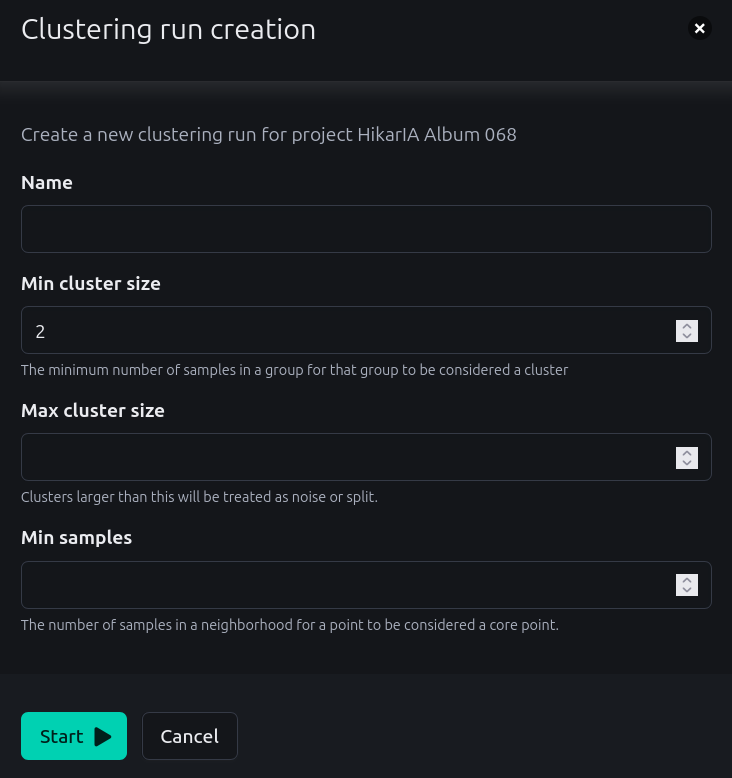
Start a clustering
You can generate clusters from the project details page, by clicking on the Create new clusters button in the project navigation or in the Clustering row of the project status table. That button is disabled until embeddings have been reduced.
It opens a modal with the following settings:
|
Display name of the cluster run, which must be unique in the project. |
|
The minimum number of elements in a group for that group to be considered a cluster, |
|
Optional. Clusters larger than this are treated as noise or split. |
|
Optional. The number of elements in a neighborhood for an element to be considered a core element. A larger value makes the algorithm more conservative, leaving more elements out of any cluster. |
Hit Start to run the clustering. You are then redirected to the details of the newly created task, where you can follow its progress.
Which elements are clustered
Only the elements that have a reduced embedding and are not already in a cluster are clustered. This means that:
-
if all the elements of your project are already clustered, you cannot start a new cluster run: you first need to delete a previous cluster run, or reduce new embeddings,
-
elements that HDBSCAN considers as noise are not put in any cluster. They stay unclustered, and are available for another cluster run with different settings.
The Clustering row of the project status table displays the number of clusters and of unclustered elements of the project.
Result
Each generated cluster is given a numeric label, which you can rename later on the cluster management page. Every element of a cluster also gets a score, which describes its distance from the cluster core elements.
Next step
Once you have generated clusters, you need to moderate them.