Create a project
| Only a Grappa administrator can create and manage projects and Arkindex instances for now. |
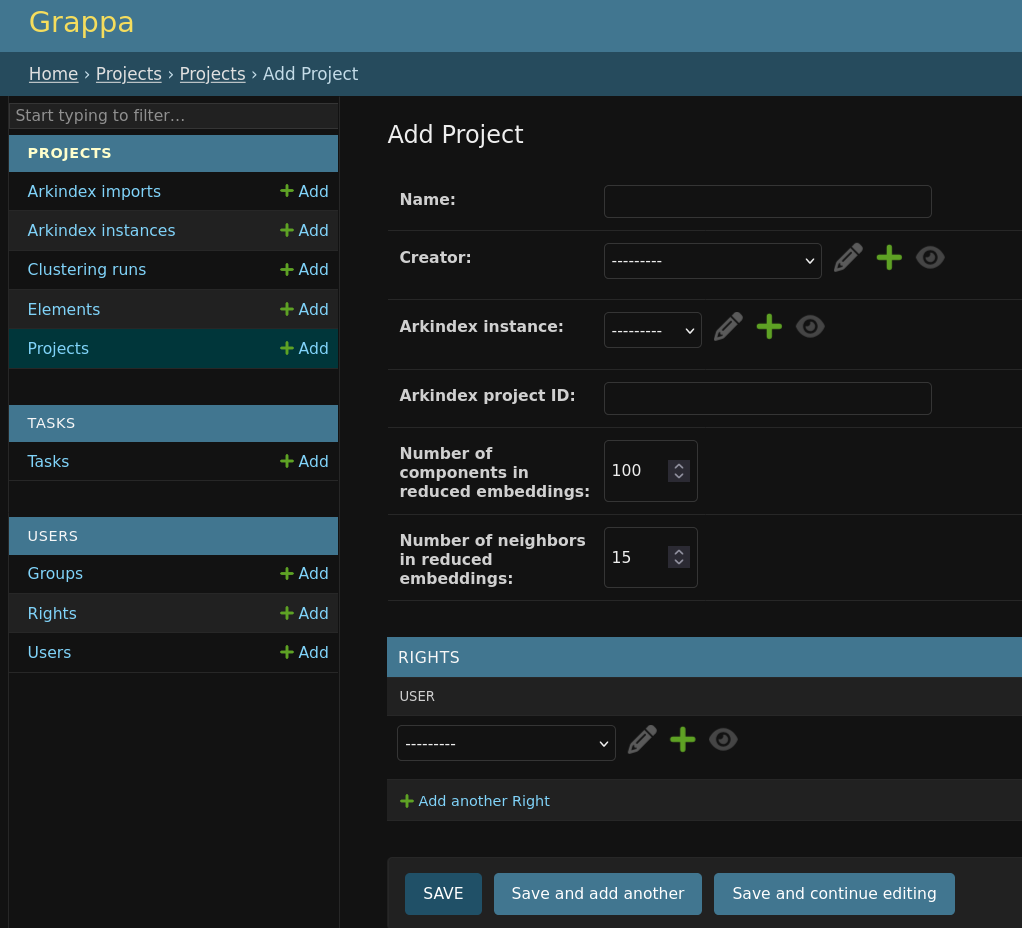
Creating a new Grappa project is easy through the administrative interface (available as /admin on your instance).
You can directly use the form available at /admin/projects/project/add/ or through this sequence of actions:
-
go to
/admin -
in the sidebar, next to
Projects, click onAdd
You then need to fill in the following fields:
-
the project name,
-
a creator user (probably your own account),
-
a source Arkindex instance (if you do not have any Arkindex instance configured, please refer to the section below),
-
the Arkindex corpus ID on that instance.
You can leave the number of components & neighbors to their default values, they can be controlled by users later on.
Access rights
By default, projects are only accessible to Grappa administrators. You need to explicitly provide access rights to users: - either directly user by user, - or for a whole group of users.
User by user
On a given project in the administrative interface, you can simply pick a user in the Access rights panel at the bottom of the page.
Select a user, then hit Save. That user has now access to the whole project through the Grappa web frontend.
Group of users
You can create and manager groups of users through the administrative interface at the /admin/users/group/ url.
A Grappa group of users is just a list of users, without any access levels: they all have the same access rights.
To set a user group on a project, it’s the same process as for a lone user. Pick the group in the Access rights panel of a project, and then hit Save. All the users immediately have access to that project.
Setup an Arkindex instance provider
As an administrator, you can manage Arkindex instance providers at the url /admin/projects/arkindexinstance/ or through the sidebar link Arkindex instances.
To create a new Arkindex instance provider, you need the following information:
- the instance name (just used for display and identification),
- the instance base URL (such as https://demo.arkindex.org)
- a user API token with access to the relevant Arkindex projects
== With the Arkindex Rest API
Create a user on Arkindex
The Grappa instance needs an API token with contributor access on Arkindex projects.
To create such a user, connect on the targeted Arkindex instance administrative panel, then:
-
use
/admin/users/user/add/admin form, -
fill in an explicit email address (even if invalid for that case, such as
grappa@company.com) and password, -
hit Save
-
On the newly user details page, hit on Change password, then disable password connection as it will never be needed,
-
mark the user as Verified email and hit Save
-
Use the API token shown on that page as the value needed for the Grappa Arkindex instance provider
By default the newly created user will not have access to private projects (on Enterprise Edition Arkindex instances), so you need to add that user to the required projects, with Contributor access.
Next step
Once you have created a project, you need to populate it with Arkindex data.