Arkindex 1.13.1
We are happy to announce that a new Arkindex release is available. You can explore Arkindex and try out the newest features on our demo instance, demo.arkindex.org.
Removals on classifications
The concepts of high confidence, validation state and moderators have been removed from classifications.
High confidence was meant to be used to allow classifiers to publish confidence scores for all of their classes, yet still distinguish which classes actually apply to an element. This has never been used in practice.
Classification states were implemented before the introduction of other products at Teklia, such as Callico, to handle manual annotation or validation of ML results better than Arkindex could. Those are now no longer used within Arkindex.
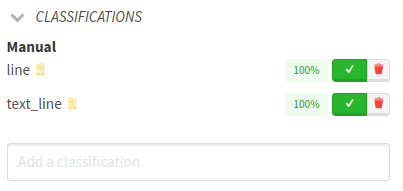
In the web interface, this means that the buttons to validate and reject classifications have been removed. The only use for the rejection button was to delete a manual classification, therefore we added a new button to delete any classification, and not just manual ones.
API and export changes
-
The
high_confidence,stateandmoderatorattributes are no longer included in database exports; -
The
high_confidenceandstateattributes are no longer readable or writable in any of the APIs; -
The
ValidateClassificationandRejectClassificationendpoints have been removed; -
The
CreateClassificationsSelectionendpoint no longer accepts amode, as it can only create and not validate classifications.
Deleting classifications
The RejectClassification API endpoint used to delete classifications instead of rejecting them, when those classifications were created manually and not from a worker run. To preserve the ability to delete a classification, a new DestroyClassification endpoint has been introduced. It allows to delete any classification, not only manual ones.
Selection
User surveys have found that the selection is a central part of most workflows. This release thus includes some new features related to the selection, and future releases will likely include further improvements on the user experience around the selection.
Selecting all filtered elements
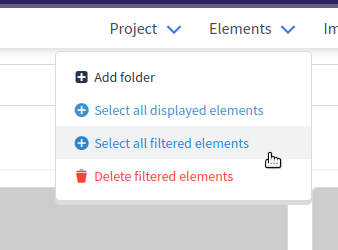
The action has for a while allowed to select all the elements displayed on the current page of results while browsing a project or a folder. This allowed to select up to 500 elements at a time.
This release introduces a parallel action, which will add every element found using the current navigation filters, thus adding every page of results at once. This allows to quickly combine the navigation and selection features for greater flexibility.
Updating selected elements
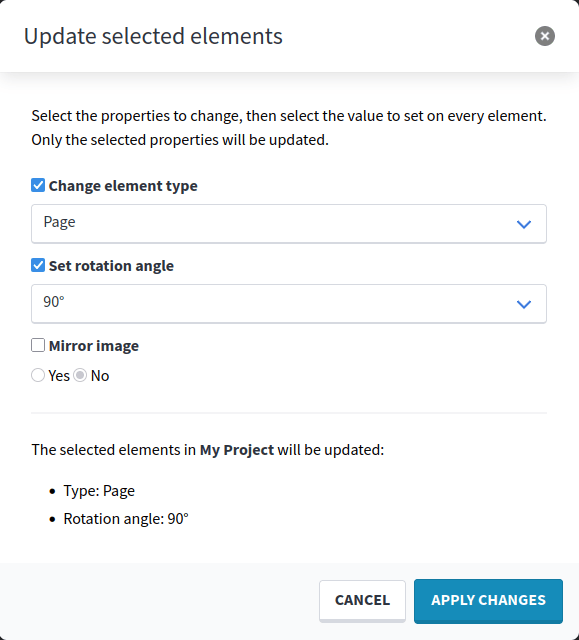
After having selected some elements, a new Update elements action allows to edit the type, rotation angle and mirrored state of all selected elements at once. This enables users to prepare elements more quickly for processing.
Performance
The following actions on selected elements have received optimizations that lower their memory usage and should allow them to run more quickly on very large selections:
-
Add classification
-
Create process
-
Export as any format
-
Add to a dataset set
These optimizations also apply to adding failed elements from a process to the selection, or directly creating a process from those failed elements.
Navigation
The filter bar available when browsing elements in a project or folder now includes two new Dataset and Dataset set filters. Those filters allow to only list elements that are included in a single set, or all sets of a dataset. This allows for more flexibility in browsing datasets than with the current dataset UI.
These new filters are supported by the aforementioned Select all filtered elements action, meaning that all elements in a dataset or a dataset set can be added to the selection at once.
Embeddings
Embeddings introduced in the previous release now have their vectors stored using single-precision floating point numbers, instead of double-precision, because the higher precision is not needed for any of their applications. This halves the storage space needed for embeddings, and may also lower the size of database exports.
When viewing any element, a new Embeddings panel at the bottom of the details panel can now display the list of worker runs that have published embeddings for that element.
The ListEmbeddings endpoint also now includes a worker_run_id filter, to only list embeddings created by a specific worker run.
New API error format
The following API endpoints have been migrated to the new error format:
The documentation for each of those API endpoints contains a detailed description of the structure of this new format.
Misc
-
Importing a YAML worker configuration that contains a field of any type other than
enumthat contains a list ofchoicesno longer causes a server error. An explicit error message is shown instead. -
Notifications in the user interface are no longer hidden in the background when a modal dialog is open.
-
On the selection page, the suggested classes in the modal are no longer hidden at the edge of the modal window.
-
Dictionary fields within worker configurations are no longer stuck with a
This field is requirederror when they are defined as required without a default value. -
String and text fields within worker configurations no longer show a
This field cannot be blankerror when they are defined as optional without a default value. -
In Enterprise Edition, restarting an agent now handles any addition, removal or change in the GPUs available to the agent without errors.
Upgrade notes
To upgrade a development instance, follow this documentation.
To upgrade a production instance, you need to:
-
Deploy this release’s Docker image:
registry.gitlab.teklia.com/arkindex/backend:1.13.1 -
Run the database migrations:
docker exec ark-backend arkindex migrate -
Update the system workers:
docker exec ark-backend arkindex update_system_workers
The main changes impacting developers and system administrators are detailed below.
Feature flag for file imports
File imports are now considered an optional feature. A new features.import feature flag has been introduced to toggle this feature. It is enabled by default, which means file imports will still work by default as they did in previous releases.
For instances that do not or should not use file imports, or those where the S3 or IIIF requirements for file imports were not already fulfilled, this new feature flag should be turned off.
The system checks related to uploading and importing files have been made stricter as a consequence of this change, as keeping the file import feature enabled means Arkindex expects a valid local image server or staging bucket.
Configurable statement timeout
A new database.statement_timeout setting has been introduced. When this parameter is set, Arkindex will define a statement timeout when connecting to the PostgreSQL database.
This helps ensure that unusually long SQL queries are automatically cancelled when they take too long, thus prevening some queries from being stuck even after the Arkindex API has already timed out and causing unnecessary load on the database.
In the context of asynchronous RQ workers, this statement timeout is always ignored, since those workers are intended to execute longer queries that would not have time to run in a single API call.
This parameter is unset by default, thus no specific timeout will be defined by Arkindex. You can choose to define it now to improve your instance’s reliability. We suggest setting it to a value above 30000, to guarantee that queries will only be cancelled after 30 seconds or more, as API requests already time out after 30 seconds.
JSON logging on asynchronous workers
The asynchronous workers started with arkindex rqworker or arkindex rqworker-pool will now include lines of JSON in their logs after a job succeeds or fails. This provides better structured logs for log aggregators to improve observability of asynchronous jobs, and paves the way for more consistent structured logging across Arkindex in the future.
PostgreSQL 18 upgrade
The development setup now uses PostgreSQL 18 with PostGIS 3.6. When starting the development architecture with make stack or make services, the PostgreSQL 18 container will fail to start if there is an existing PostgreSQL 17 database.
We have updated our repository with a custom Docker image and some instructions to help developers upgrade their local databases from PostgreSQL 17 to 18. If you would rather start from scratch, run docker volume rm arkindex_pgdata then follow the database initialization steps.
This change only impacts developers, not system administrators. Arkindex 1.13.1 still officially supports PostgreSQL 15 or later, as it did before.