Arkindex 1.13.2
We are happy to announce that a new Arkindex release is available. You can explore Arkindex and try out the newest features on our demo instance, demo.arkindex.org.
Navigation
A new classification worker run filter has been added to the filter bar. This allows to only include elements classified by a specific worker run.
Classifications
The search filter on ListCorpusMLClasses has been replaced with a simpler name filter. This filter will not split the query into search terms:
-
typing
app notornot ablewill no longer match a class namednot applicable, butnot appwill still match; -
typing
cluster 1 | cluster 1will no longer match a class namedcluster 1 | cluster 2.
This affects adding a class manually to an element from the web interface, as well as filtering classes by name from the Classes tab of the project information page.
Datasets
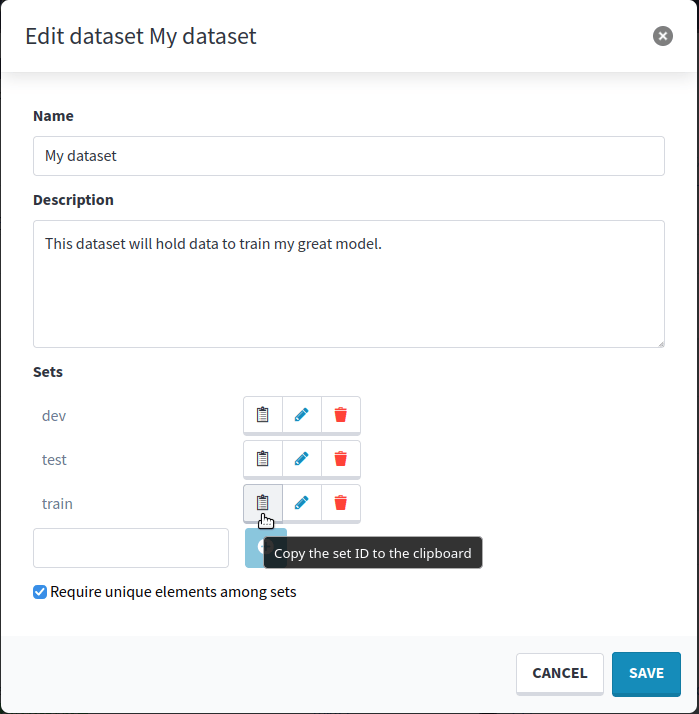
To make the dataset set filter introduced in the previous release easier to use for developers, the ID of a single dataset set can be copied from the dataset edition modal.
Worker management
Worker versions can now be archived, just like workers. This allows for old versions of a worker to be hidden from view and made unavailable for use in processes without needing to archive the whole worker.
Groups
| This feature is only available in Enterprise Edition. |
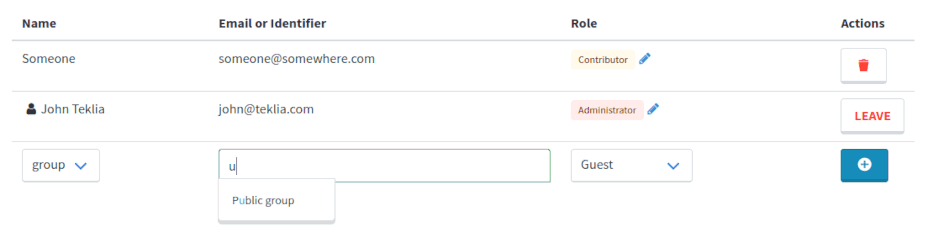
When managing members of a project, worker, model, budget or secret, it is now possible to search for groups by name. The search will both include groups that the current user is a member of, and groups that have been made public.
When browsing groups from the Groups tab of the profile page, the list of groups will now also include all publicly available groups, even those that the current user is not a member of.
Asynchronous jobs
Arkindex now ensures that some resource-heavy asynchronous jobs are not being duplicated:
-
Multiple deletions can no longer be scheduled at once for the same project, element, or process;
-
Multiple moves can no longer be scheduled at once for the same element or for selected elements;
-
Selected elements cannot be linked to the same parent multiple times;
-
Image checks when using external validation will not be rescheduled when a check was already pending;
-
A worker activity initialization will not be rescheduled when starting or retrying a process if one was already running for that process.
API
Deprecation
The ListDatasetElements API endpoint is deprecated and will be removed in Arkindex 1.14.0.
It is replaced by the dataset and dataset set filters introduced in the previous release on ListElements.
Misc
-
Fixed an issue that prevented importing IIIF manifests from ZIP or TAR archives and caused
AttributeErrorerror logs. -
SelectProcessFailuresno longer fails when attempting to select elements with failed worker activities on a process while some of those elements were already in the selection. -
Fixed an issue that prevented the API documentation page from loading following the release of Redoc 3.0.
-
The process elements filtering page no longer shows an incomplete set of classes when the option was selected in the element navigation.
Upgrade notes
To upgrade a development instance, follow this documentation.
To upgrade a production instance, you need to:
-
Deploy this release’s Docker image:
registry.gitlab.teklia.com/arkindex/backend:1.13.2 -
Run the database migrations:
docker exec ark-backend arkindex migrate -
Update the system workers:
docker exec ark-backend arkindex update_system_workers
The main changes impacting developers and system administrators are detailed below.
Splittable cleanup command
The arkindex cleanup command now accepts a list of step names as arguments. This allows system administrators to run only part of the cleanup or to reorder the cleanup steps. Running the command without any arguments continues to execute the cleanup like before.
The list of step names and their default execution order have been added to the command documentation.